

Quality content is only one piece of a high-performing medical SEO strategy. To stay ahead of the competition, you also need solid campaign management, ongoing troubleshooting, effective keyword research, regular results analysis, and the right tools.
That’s why strong analytics and SEO expertise matters so much for medical clinics and healthcare practitioners. When you focus only on content, you risk neglecting the other critical areas that can quietly undermine your efforts and your SEO campaigns.
In this post, we break down the seven core steps of analysing and managing an SEO campaign for medical and healthcare practices, from improving your SEO ranking to ongoing optimisation.

Assuming your medical or clinic website is live and your content is running, the next crucial step is connecting it to Google’s free measurement tools so you can see what’s actually working. Two tools matter most: Google Analytics 4 and Google Search Console.
GA4 is Google’s core analytics tool. It shows what visitors do once they land on your site: how many people visit, where they come from, which pages they view, and what actions they take, such as calling your clinic or submitting a booking form. For a medical practice, this tells you which pages and channels bring in real patients, not just traffic.
GA4 is especially powerful when paired with Google Tag Manager. Tag Manager lets you set up custom events that fire when a visitor takes a specific action, such as clicking your phone number, submitting an appointment form, or clicking a “Book Now” button, without editing your website’s code each time.
Search Console is your best friend when it comes to analysing SEO results and running campaigns. It shows which exact queries people use to find your clinic, how often your pages appear, and your average ranking position.
It also reports on whether the structured data, images, and videos you’ve added to your website are indexed, and where they appear. More importantly, Search Console alerts you if your site has received a manual action or has security issues, both of which can seriously damage your visibility.
When using Google Search Console (GSC), there are some common trends and patterns that we pay close attention to in clinic SEO campaigns. Most of them can be found in the Performance report.
Let’s go through eight of them so that all those numbers start to make sense.
Search queries and impressions are the first sign that your SEO campaign is working. Showing up for a search query means Google is taking your clinic seriously for terms patients are actually searching, and is displaying your content in search results and AI Overviews.
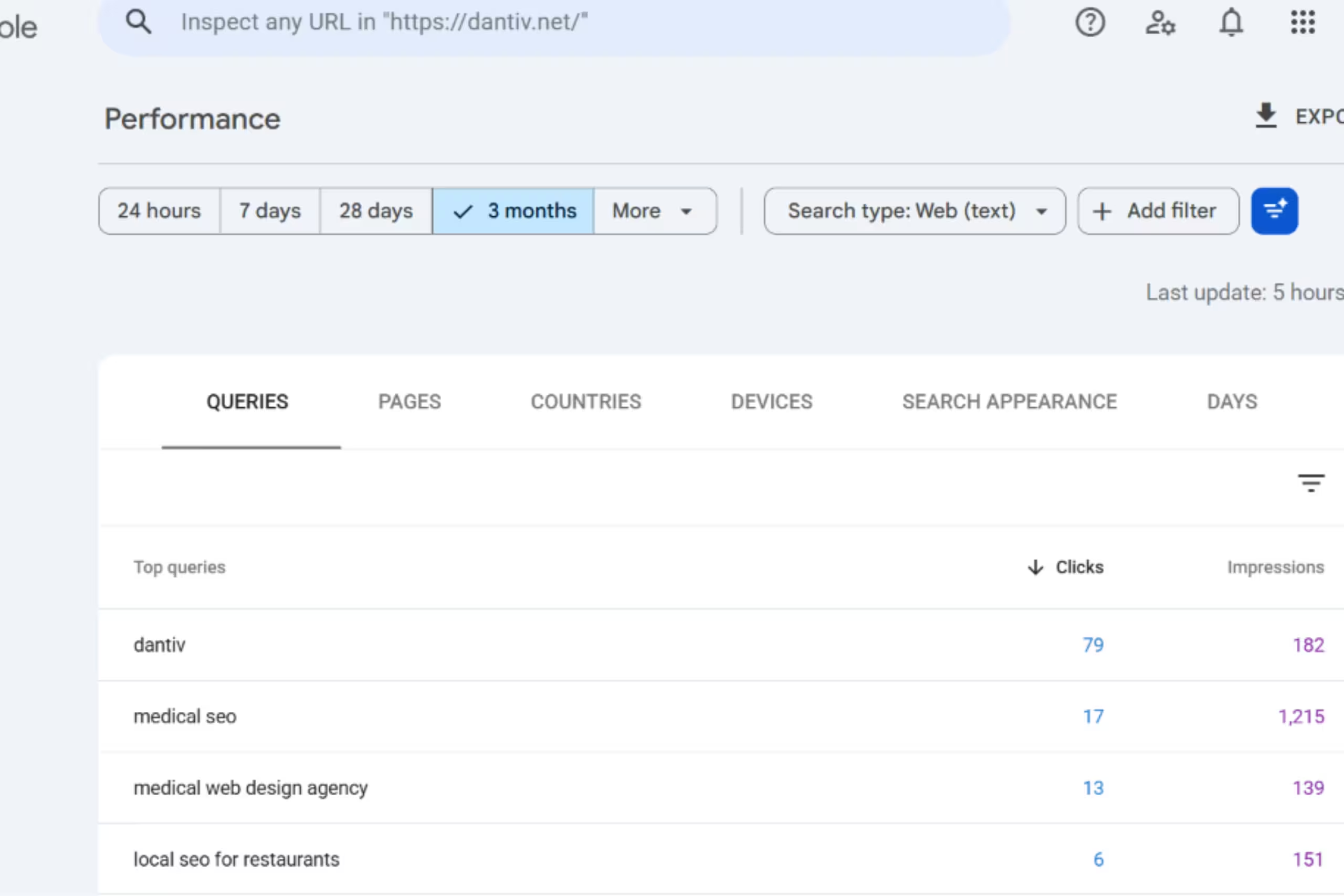
For a clinic, this might mean your knee pain treatment page starts appearing for queries like “knee replacement recovery time” or “when to see a doctor for knee pain,” even before it earns many clicks. Rising impressions for a keyword or topic pillar tell you your efforts are starting to land. It’s a signal to keep investing in that topic if you want your clinic to rank competitively for it.
Look at which search queries bring people to your site, how many impressions and clicks each one earns, and how the number of queries changes over time. A growing list of queries means Google is showing your clinic for a wider range of searches and is a great sign of potential.
Showing up for queries is all well and good, but for a clinic or medical practice to actually generate leads through SEO, what you need are clicks.
Getting clicks means two things: your content pages are ranked high enough to matter, and your search result display mix (title hook, meta description, images, and rich snippets) is working well enough to generate the interest needed to earn a click.
When improving CTR, we suggest focusing on the title, display image, and rich snippets, as these take up the most space and are the most eye-catching elements in search results. Try different title variations and pay close attention to the display image you select to improve CTR.
Tested and proven page title hooks include:
You can select a webpage in Search Console to see its position in search results and track how that position changes over time. This shows you whether your SEO efforts are paying off and whether a page or topic deserves more content.
A good habit is to use the “Compare” option in the date filter. It places two periods side by side, such as this month and last month, so you can quickly see which pages and queries are improving and which are declining.
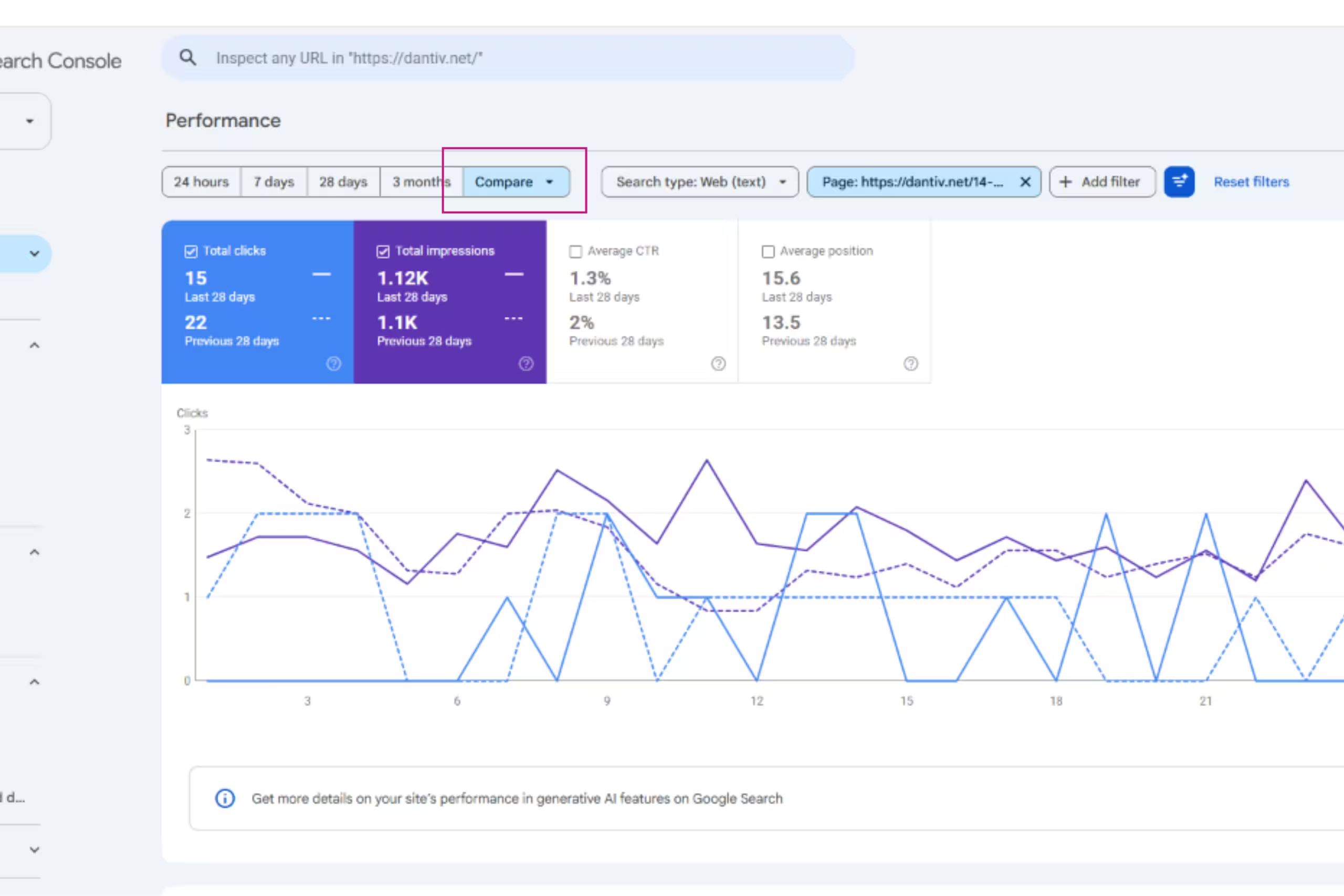
Used regularly, this helps you and your team spot new opportunities and see which topic areas your clinic is starting to build authority in.
Generative AI now gets involved in referring content to searchers looking for specific queries. Because answer engines handle queries differently compared to the standard algorithm, you should also review your clinic’s performance in AI Overviews.
View your performance in Google Search Console using the Generative AI tab. You can also consider other tools such as Semrush AI Toolkit, Otterly, and Rankscale to get a better picture of where you stand.
The Insights and Trending tab offers a quick and easy way to review the moving parts of your SEO efforts. Use this to get a heads up on how your website content is performing, what’s trending up (and down!), and the search queries that actually lead to your website.
The Page Indexing report shows which pages on your website Google has added to its index, and which ones it hasn’t. A page that isn’t indexed can’t appear in search results or AI Overviews, so no amount of content work will bring patients to it.
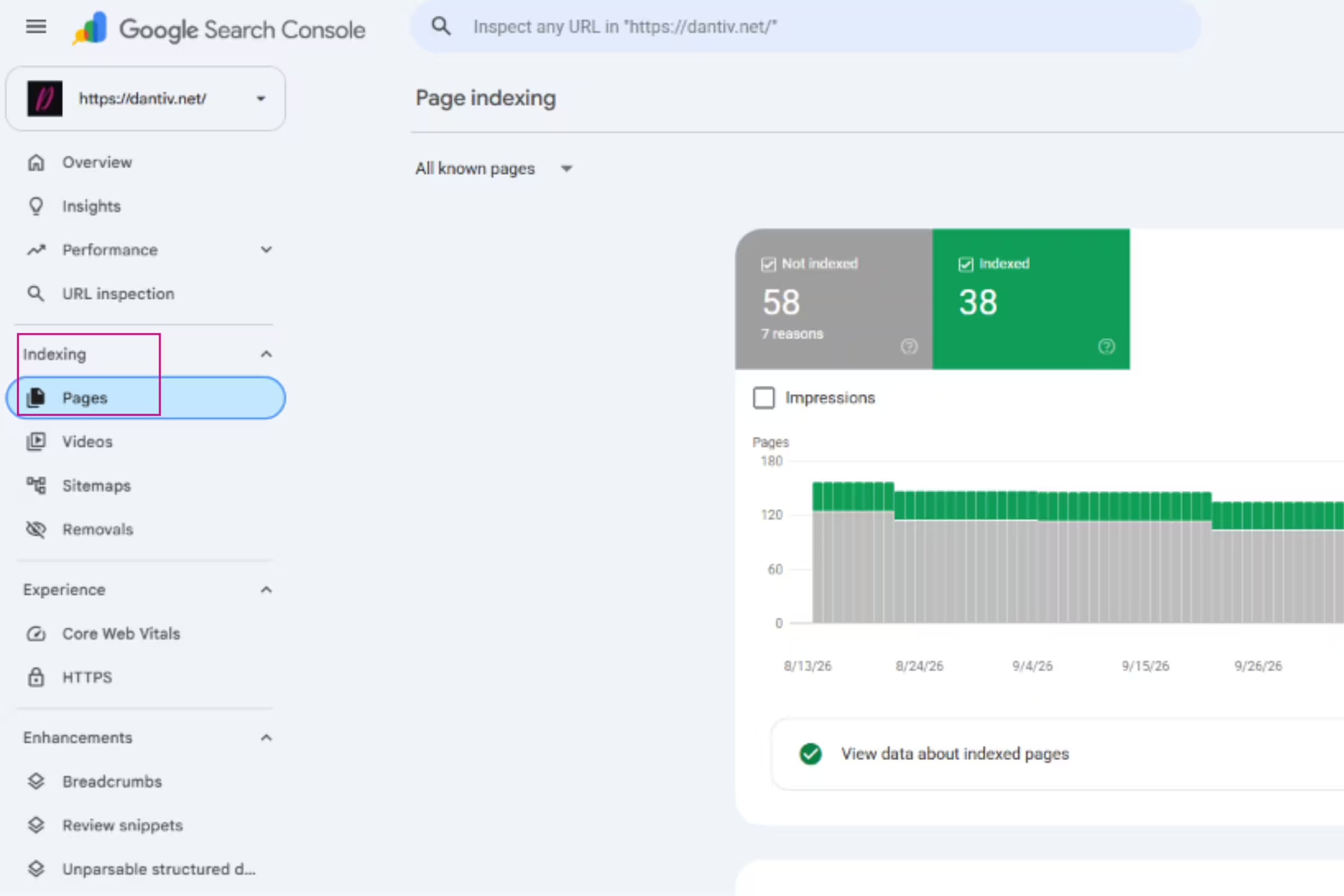
For a clinic, this is critical for your service, treatment, and location pages. The report also tells you why each page was left out. Here’s how to read the main ones:
Check this report regularly, especially after publishing new service pages or updating your website. A sudden jump in “Not indexed” pages is worth investigating right away.
The Enhancements section in Google Search Console shows which structured data Google has read on your website. Structured data is extra code that labels your content, such as your reviews, address, or page hierarchy, so Google can understand and present it better.
Valid items can become rich snippets: extra details like star ratings, breadcrumbs, or images shown alongside your listing in search results.
Having valid markup doesn’t guarantee appearance. Google decides whether it’s useful for a given search. But without valid markup, you’re not in the running at all.
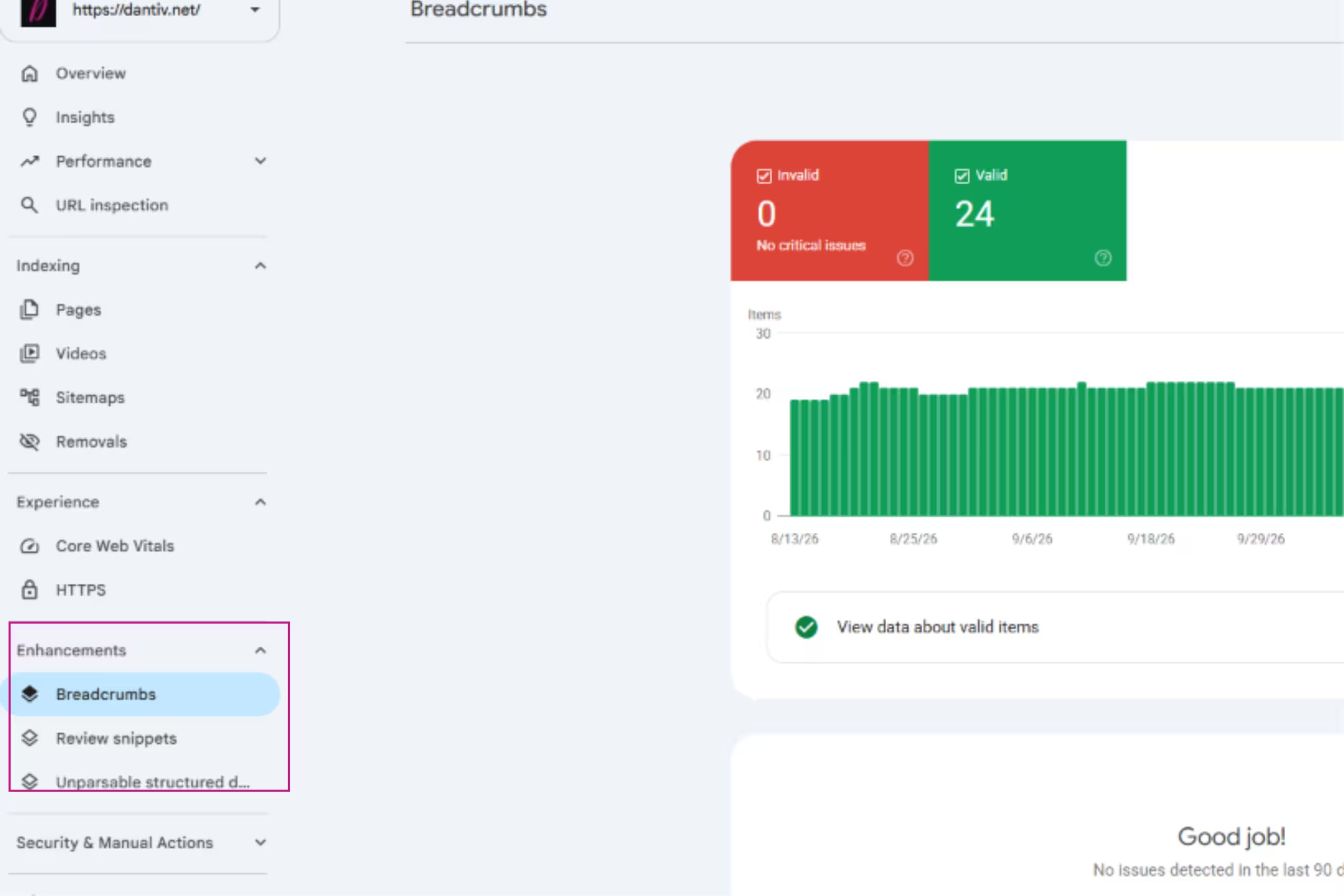
For clinics and medical practices, these are the ones worth paying attention to:
Also watch for the Unparsable structured data report. It flags markup that Google couldn’t read at all, usually because of a code error.
Check this section after publishing new pages or updating your website, since a theme or plugin change can break your markup without anyone noticing.
The Security and Manual Actions section is where Google tells you if something is seriously wrong with your website. Manual actions are penalties applied by a Google reviewer when a site breaks its spam or quality guidelines.
Security issues flag problems such as hacked content, malware, or deceptive pages. Either one can cause your pages to drop in search results, so a clinic should never leave them unchecked.
The ideal result is a green “No issues detected” message in both reports. If you see anything else, don’t panic. Google lists the affected pages and explains the issue, and you can request a review once it’s fixed.
This brings us to the next step: finding and making use of new keyword opportunities. As you publish more content, you’ll likely find yourself ranking for more and more keywords.
This is a good sign. It means you have traction in those areas, and if they have commercial value to your clinic, they’re worth going deeper on to build authority.
Use the Queries report in Search Console to find them, then separate what you find into two groups:
Prioritise keywords where you already rank on page two or low on page one, since a small push can move them into view. Then create new content that strengthens your authority around them.
When choosing keywords to target, consider whether an AI answer can fully satisfy the search. General questions like “what is a root canal” are often answered directly in AI Overviews, so fewer people click through.
Focus instead on topics where the patient needs your website to get the full answer, such as:
There’s more to deciding to meet with a doctor than just finding one. The vibe, people, and the whole experience can make or break a clinic visit.
Semantic SEO means covering a topic thoroughly rather than targeting one keyword at a time. This shows Google you are a reliable source on the subject, which makes your pages more likely to appear in search results and AI Overviews.

For example, a dental clinic with a strong implants page could add supporting content on implant costs, recovery, aftercare, and who is suitable for implants. The topic tree might look like this:
Dental Implants (main service page)
Each supporting page should link back to the main implants page, and vice versa. This structure is what signals to Google that your clinic covers the topic in depth.
Not every patient will reach out through your website. Many find your clinic through your Google Business Profile, the listing that appears in Google Search (Map pack) and Google Maps.
For specialities like dentistry and GPs, where patients often search for nearby providers, tracking this channel shows you which marketing efforts are actually working.
Here’s how to do it.
Your Business Profile reports how many people viewed your listing, called you, requested directions, or clicked through to your website.
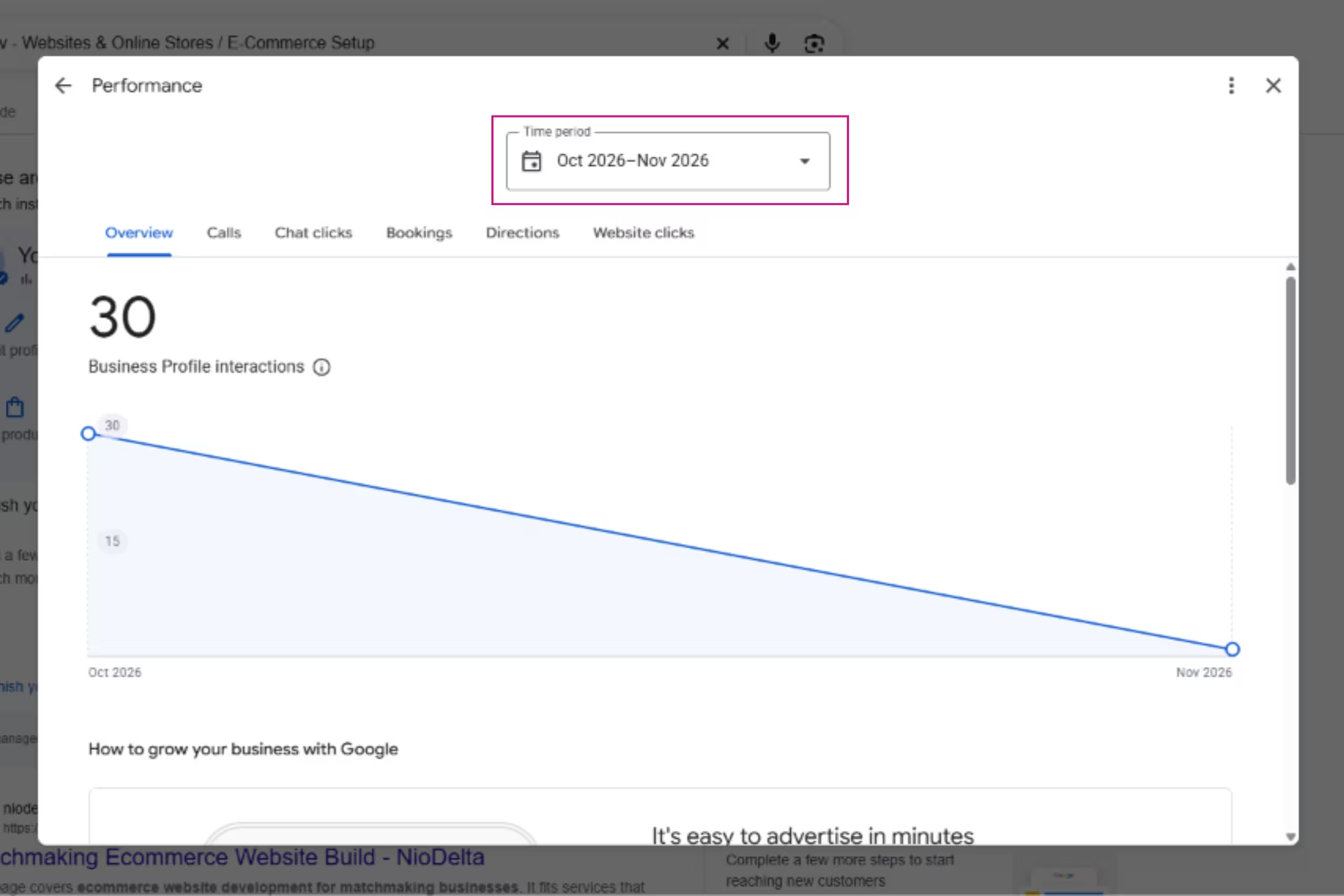
Compare these numbers to see whether your local visibility is growing, and which actions patients take most often.
In GBP, review the search terms people used to find you. It helps you see whether patients are searching for a service (such as “teeth whitening”), a condition, or your clinic name.
Use these terms to guide the keywords on your service pages and the wording of your profile.
Add UTM parameters to the website link on your profile, for example ?utm_source=google&utm_medium=organic&utm_campaign=gbp. This lets GA4 separate visitors from your Business Profile from other organic traffic, so you can see what they do on your site and whether they book.
When you combine profile metrics with your GA4 conversion data, you get a fuller picture of how patients find you, whether through the website, the map listing, or a phone call.
Let’s take it a step further by looking at how visitors actually interact with your site, and what drives interest and engagement.
This is where heatmap tools such as Microsoft Clarity and Hotjar come in. Heatmaps give you a visual picture of how people use each page, so you can spot what actually works and what gets ignored. They typically show you:
This can reveal real problems on a medical or clinic website, such as a “Book Now” button placed too low on mobile, a service page that was too wordy, or a faulty contact form.
Fixing these issues improves enquiries and provides perspective or opportunities to improve your site.
Doing SEO for the medical industry and clinics is intensive work. At times it feels like running in a mist: you’re exerting strength, and yet you can’t really see the path. Fortunately, there are tools to help.
Screaming Frog SEO Spider is a website crawler that scans your clinic’s site the way a search engine would and reports what it finds. It runs on your desktop, hence you need to download it on your device rather than using it in a browser. Once it has crawled your site, you can use it to:
Ahrefs is a browser-based SEO platform known for its large database of keywords and backlinks. Here is what to use it for:
Yoast is one of the most widely installed SEO plugins for WordPress, but few people use it to its full potential.
Behind that simple interface is a set of tools that handle a lot of the technical SEO work for you:
Treat Yoast as a checklist rather than a score. It doesn’t guarantee rankings, so use suggestions to catch misconfigured basics and minor issues.
The Rich Results Test is a free tool from Google that checks whether a page’s structured data can be read and is eligible for rich results in search.
You paste in a page’s URL, and it shows which types of markup Google found, along with any errors or warnings that need fixing.
For clinics, it’s a quick way to confirm that the markup behind your reviews, breadcrumbs, author details, and clinic information is working.
Search Console’s Enhancements reports will flag these issues eventually, but this test lets you check a page right away, before or after it goes live.
Analysing and managing an SEO campaign for a clinic comes down to a few steady habits: tracking how patients find you, checking that your pages are indexed and eligible for rich results, finding new keyword opportunities, and using the right tools to see what is working.
You don’t need to do everything at once. Start with Google Search Console, pick one or two quick wins, such as a page two keyword or a weak title, and review your progress each month.
SEO takes time, but small, consistent improvements add up to more visibility, more trust, and more patients choosing your clinic.